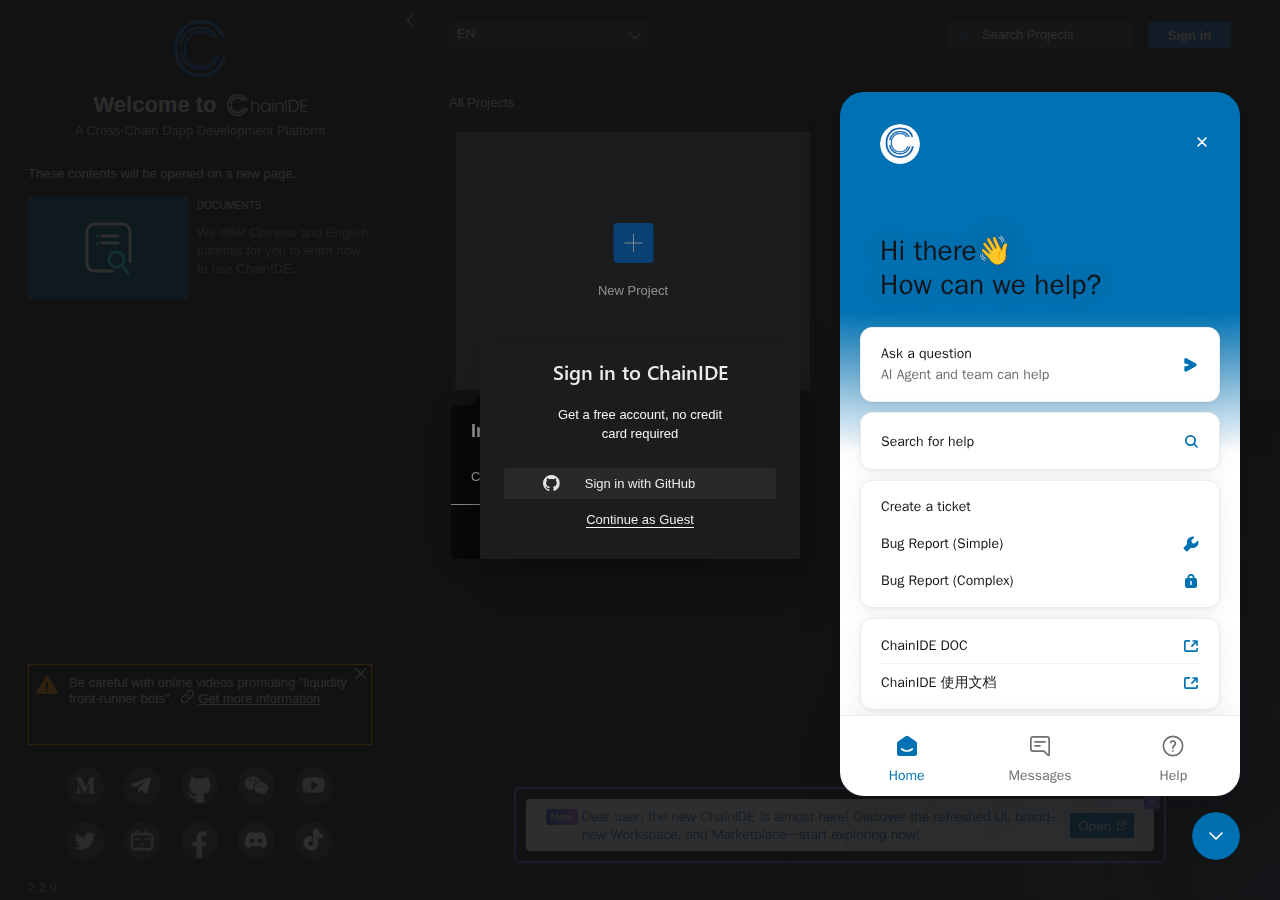
Explore/chainide.com
Hosted appArc Testnet ↗succeeded

chainide.com

chainide.com ↗

Tested in place byDeepQA TeamonArc Testnetatchainide.com/onOct 13, 2026

Run #2model gemini-balancedtook 12m

6 of 9 scenarios passed, 3 blocked, no issues after the audit.

Share on X
chainide.com in the browser during the run

By the numbers

6 of 9
scenarios passed, 1 failed, 2 blocked
103
browser actions
19
screenshots
109
model calls
19
minutes
9
scenarios
6
passed
0
failed
3
blocked
0
issues

Walkthrough

Every scenario DeepQA drove in the browser, in plan order, with the 17 screenshots it captured along the way. A passing scenario is evidence too.

  1. S1
    Navigate to Projects Dashboard

    2 steps, 2 screenshots

    pass
    S1-4.png
    S1, Navigate to Projects Dashboard
    S1-6.png
    S1, Navigate to Projects Dashboard
    • Clicking the 'Code Smarter' button opens a new tab targeting https://chainide.com/s/dashboard/projects.
    • On the home page https://chainide.com/, clicking the 'Code Smarter' button triggers navigation to https://chainide.com/s/dashboard/projects.
    • The projects dashboard at https://chainide.com/s/dashboard/projects loads successfully with 'All Projects', 'New Project', search functionality, and documentation links.
  2. S2
    Load Ethereum IDE Workspace

    2 steps, 2 screenshots

    pass
    S2-2.png
    S2, Load Ethereum IDE Workspace
    S2-4.png
    S2, Load Ethereum IDE Workspace
    • Navigated to https://chainide.com/s/ethereum and observed the Ethereum smart contract editor workspace loading properly with the explorer sidebar, editor panels, toolbar, and footer.
    • The Ethereum IDE workspace loaded successfully at /s/ethereum with the Explorer panel, editor area, Output/Sandbox tabs, and setting status bar.
    • No console errors or crash states were observed during workspace loading.
  3. S3
    Filter Dashboard Projects

    3 steps, 2 screenshots

    pass
    S3-5.png
    S3, Filter Dashboard Projects
    S3-6.png
    S3, Filter Dashboard Projects
    • Navigated to https://chainide.com/s/dashboard/projects and found the 'Search Projects' searchbox.
    • Typed 'TestProjectXYZ' into the 'Search Projects' input and pressed Enter; the project heading updated to 'All Projects (filter by: TestProjectXYZ)' with no projects listed, displaying the filtered zero-results state without errors or crashing.
    • Navigated to /s/dashboard/projects where the projects view was loaded.
    • Typed 'TestProjectXYZ' into the 'Search Projects' searchbox and pressed Enter.
    • The project list header updated to 'All Projects (filter by: TestProjectXYZ)' displaying the zero-results empty state cleanly with no console errors or page crashes.
  4. S4
    Trigger New Project Action

    2 steps, 1 screenshot

    blocked
    S4-10.png
    S4, Trigger New Project Action
    • Navigated to /s/dashboard/projects and found the 'New Project' button.
    • Navigated to https://chainide.com/s/dashboard/projects.
    • The page loaded with an alert banner warning about scam bots and a dashboard listing projects.
    • The 'New Project' element exists in the DOM but is not interactable/visible to click interactions due to page layout or overlay structures.
  5. S5
    Trigger Sign In Action

    2 steps, 1 screenshot

    blocked
    S5-9.png
    S5, Trigger Sign In Action
    • Navigated to https://chainide.com/s/dashboard/projects and found the 'Sign in' button.
    • Navigated to https://chainide.com/s/dashboard/projects.
    • The dashboard interface rendered with 'Sign in' button, search box, and project controls.
    • Clicking the 'Sign in' button timed out because the element failed the automated driver visibility check due to page layout dimensions (root height 0px).
  6. S6
    Unsupported Chain 404 Recovery

    3 steps, 3 screenshots

    blocked
    S6-2.png
    S6, Unsupported Chain 404 Recovery
    S6-11.png
    S6, Unsupported Chain 404 Recovery
    S6-12.png
    S6, Unsupported Chain 404 Recovery
    • Navigated to https://chainide.com/s/bsc and observed 404 error page with message 'The page you are looking for is not found' and a link to /s/.
    • Navigated to unsupported chain route https://chainide.com/s/bsc.
    • The page rendered a 404 message 'The page you are looking for is not found' and an anchor element pointing to '/s/'.
    • Attempted to click the recovery link to return to /s/, but click actions timed out as the link failed interactivity checks.
    • The browser URL remained at https://chainide.com/s/bsc and did not navigate away from the error page.
  7. S7
    Terms of Use Navigation

    2 steps, 2 screenshots

    pass
    S7-2.png
    S7, Terms of Use Navigation
    S7-4.png
    S7, Terms of Use Navigation
    • Navigated from the landing page by clicking the 'Terms of Use' link in the footer to https://chainide.com/tos, which successfully displayed the ChainIDE Terms of Service content with no console errors.
    • The Terms of Use link at the footer points to /tos/ and upon clicking navigates successfully to https://chainide.com/tos.
    • The Terms of Service page rendered completely with heading 'ChainIDE Terms of Service' and full legal policy text.
    • No console errors or 404 responses occurred.
  8. S8
    Privacy Policy Navigation

    2 steps, 2 screenshots

    pass
    S8-2.png
    S8, Privacy Policy Navigation
    S8-3.png
    S8, Privacy Policy Navigation
    • Navigated to https://chainide.com/ and clicked the 'Privacy Policy' footer link, which successfully navigated to https://chainide.com/privacy displaying the ChainIDE Privacy Policy document.
    • The 'Privacy Policy' link on the homepage footer at https://chainide.com/ links to /privacy/.
    • Clicking the link navigates to https://chainide.com/privacy, rendering the 'ChainIDE Privacy Policy' heading and the complete privacy policy text without errors.
  9. S9
    Verify Absence of Console Errors

    2 steps, 2 screenshots

    pass
    S9-3.png
    S9, Verify Absence of Console Errors
    S9-4.png
    S9, Verify Absence of Console Errors
    • Navigated to https://chainide.com/s/dashboard/projects and inspected console errors; 0 errors found.
    • Navigated to https://chainide.com/s/dashboard/projects and verified that the page loaded successfully.
    • The browser console recorded 0 errors (including zero ERR_BLOCKED_BY_RESPONSE errors or uncaught exceptions) from the target origin.

Issues

Findings that survived the Critic's audit. Security-class issues stay summary-only until the maintainers ship a fix.

lowwithdrawnfunctionalF1 in S6

Recovery link on unsupported chain 404 page is not interactable

The record states the click attempt timed out because the link failed the test driver's automated interactivity checks, which is a limitation of the driver handling the page layout rather than a defective control.

Expected

The recovery link should be interactable and clicking it should navigate the browser away from /s/bsc to /s/.

Actual

The recovery link anchor pointing to '/s/' cannot be interacted with and click attempts time out, leaving the user on https://chainide.com/s/bsc.

3 repro steps
  1. Navigate to https://chainide.com/s/bsc
  2. Observe the 404 error page with 'The page you are looking for is not found'
  3. Attempt to click the recovery link pointing to /s/

Critic audit

An adversarial second pass over every finding before it reaches the report.

1
findings reviewed
0
live replays
1
withdrawn
  • F1withdrawn

    The record states the click attempt timed out because the link failed the test driver's automated interactivity checks, which is a limitation of the driver handling the page layout rather than a defective control.

  • The test driver was repeatedly blocked from interacting with page controls (buttons and links) due to visibility constraint failures, such as reading a 0px root height layout container, restricting the run's coverage of interactive features.

Report

QA report: chainide.com

No confirmed defects were found, though layout constraints blocked interaction testing across several scenarios.

Exploratory testing exercised nine scenarios across navigation, dashboard views, legal pages, console error checks, and the Ethereum IDE workspace. Six scenarios passed successfully, including core navigation and project filtering. One initial finding regarding an unsupported chain recovery link was reviewed during the audit and withdrawn, leaving zero confirmed issues.

Three scenarios were blocked before completion: triggering a new project, initiating sign in, and recovering from an unsupported chain route. In each case, automated element visibility checks failed due to zero-height container layout structures on the page, preventing direct interaction with the targeted buttons and links.

While the functional flows that completed showed no errors, coverage of interactive workflows such as authentication and project creation remains incomplete due to these interaction blockers.

Run summary
MetricCount
Scenarios executed9
Passed6
Failed0
Blocked3
Findings raised1
Issues after the audit0
Withdrawn by the audit1
Critical / high / medium / low0 / 0 / 0 / 0
  • Target: https://chainide.com/
  • Testing level: exploratory
  • Stack: unknown
Issues

No issues survived the audit.

Withdrawn findings

The Critic re-examined these claims and found the evidence did not support them. They are kept here rather than deleted.

  • Recovery link on unsupported chain 404 page is not interactable (S6, low): The record states the click attempt timed out because the link failed the test driver's automated interactivity checks, which is a limitation of the driver handling the page layout rather than a defective control.
Scenario results
ScenarioPriorityResultIssues
S1 Navigate to Projects Dashboardhighpassnone
S2 Load Ethereum IDE Workspacehighpassnone
S3 Filter Dashboard Projectsmediumpassnone
S4 Trigger New Project Actionmediumblocked (The 'New Project' button could not be interacted with due to non-interactive element visibility constraints on the dashboard page.)none
S5 Trigger Sign In Actionmediumblocked (Automated driver could not interact with the Sign in button due to zero-height page layout container preventing standard element visibility checks.)none
S6 Unsupported Chain 404 Recoverymediumblocked after audit (The test could not perform click the recovery link, so the main result could not be checked.)none
S7 Terms of Use Navigationlowpassnone
S8 Privacy Policy Navigationlowpassnone
S9 Verify Absence of Console Errorslowpassnone
The audit

The Critic reviewed 1 finding and ran 0 live replays in the browser, each on a fresh page. 0 of the 0 reported issues were reproduced live.

  • The test driver was repeatedly blocked from interacting with page controls (buttons and links) due to visibility constraint failures, such as reading a 0px root height layout container, restricting the run's coverage of interactive features.
Coverage and caveats

In scope:

  • Landing page navigation and legal links
  • Projects dashboard guest experience
  • Search functionality on the dashboard
  • Unauthenticated Ethereum IDE workspace loading
  • 404 error page handling and recovery
  • Console error checking for cross-origin issues

Not covered:

  • Sign-in and account registration flows (needs an account, out of scope for a hosted run)
  • Wallet connection flows (requires third-party extensions and account, out of scope for a hosted run)
  • Smart contract compilation and deployment (needs an account, out of scope for a hosted run)
  • The application is tested as a guest user; authenticated project creation and code compilation cannot be completed.
  • The guest experience permits loading the IDE workspace and dashboard, but may prompt for authentication on specific actions like creating a new project.
  • S4 could not be executed: The 'New Project' button could not be interacted with due to non-interactive element visibility constraints on the dashboard page..
  • S5 could not be executed: Automated driver could not interact with the Sign in button due to zero-height page layout container preventing standard element visibility checks..
  • S6 could not be executed: The test could not perform click the recovery link, so the main result could not be checked..
By the numbers
MetricValue
Scenarios6 passed, 1 failed, 2 blocked of 9 (20 planned steps)
Browser actions103 (18 clicks, 6 inputs, 27 navigations, 52 snapshots)
Screenshots19 (2 explore, 17 scenario, 0 critic), 17 captioned
Coverage6 pages, 1 forms, 3 flows, 1 console errors
Audit1 findings, 0 re-verified live, 0 confirmed, 0 promoted, 1 withdrawn
Time19 min

Run log

stagecallstokenstime
Explore22144.3k4m 48s
Plan29.9k1m 1s
Test81548.4k10m 38s
Critique18.6k22s
Report12.1k5s
Verify23.5k2m 18s
Total109716.9k19m 13s
✓Intake
–Explore
✓Plan
✓Test
✓Critique
●Report
  • 01:39:37Zintakeintake started
  • 01:39:37ZintakeExternal target https://chainide.com/, tested in place.
  • 01:39:37ZexploreExplored in the plan phase: its map is reused.
  • 01:39:38Zplanplan started
  • 01:39:38ZplanUsing the plan of run run-mv5zylfbtsqu unchanged: 9 scenarios.
  • 01:39:38Zplanplan completed in 0s.
  • 01:39:38Ztesttest started
  • 01:40:15ZtestS1 executed (pass)
  • 01:40:33ZtestS2 executed (pass)
  • 01:41:07ZtestS3 executed (pass)
  • 01:45:49ZtestS4 executed (blocked)
  • 01:48:04ZtestS5 executed (blocked)
  • 01:49:30ZtestS6 executed (fail), 1 finding
  • 01:49:43ZtestS7 executed (pass)
  • 01:49:56ZtestS8 executed (pass)
  • 01:50:16ZtestS9 executed (pass)
  • 01:50:16ZtestExecuted 9 scenarios: 6 passed, 1 failed, 2 blocked, 1 finding.
  • 01:50:16Ztesttest completed in 638s.
  • 01:50:16Zcritiquecritique started
  • 01:50:39Zcritique1 severity was set from the impact and likelihood matrix: F1 low.
  • 01:50:39ZcritiqueReviewed 1 findings; 0 possible defects spotted in passed scenarios.
  • 01:50:39Zcritique1 scenario result was changed by the audit: S6 fail to blocked.
  • 01:50:39ZcritiqueAudit complete: 0 confirmed, 1 withdrawn, 0 promoted, 0 re-verified live.
  • 01:50:39Zcritiquecritique completed in 22s.
  • 01:50:39Zreportreport started
  • 01:50:44ZreportReported 0 issues (0 critical, 0 high, 0 medium, 0 low) from 1 finding.
  • 01:50:44Zreportreport completed in 5s.
  • 01:51:12ZreportReport r1 passed the release gate.

Put an agent team on your next pull request.

Connect a repo, dispatch a Run, and read an audited, evidence-backed report the same day.